Here’s another minor release for Musictube. Musictube is now available for Ubuntu 64bit. Enjoy!
- Autoupdate
- Updated Windows toolbar style
- Ubuntu Ambiance theme integration
- OS X Mountain Lion notifications
- Fixed playlist drag’n’drop
- Fixed system language settings detection
- Fixed video infinite loop with Phonon VLC backend on Linux
- New and updated translations
This is just a minor release for Musique. 1.2.1 includes a significant speed up in the way artist photos and album cover are painted to screen. This makes scrolling faster. Autoupdating Windows and Mac versions. Updated toolbar style for Windows and Ubuntu.
- Faster painting of artist photos and album covers
- Autoupdate on Mac and Windows
- Updated Windows toolbar style
- Ubuntu Ambiance theme integration
- Fixed system language settings detection
- New and updated translations
This update focuses on polish and fixes a showstopper bug that caused artist names from Last.fm to be read incorrectly. All users are advised to rescan their collections. Basically Musique was parsing data from Last.fm in a rather sloppy way and new data in the web services replies triggered the bug. All is well and good now.
Here’s the full change log:
- Fixed wrong artist names, please rescan your collection
- Long artist names and album titles displaying incorrectly
- Fixed disabled Info button when the playlist finishes
- Better playlist drag’n’drop support
- OS X Mountain Lion notifications
- Mac Sandbox support
- Compatible with OS X Mountain Lion Gatekeeper
- Partial Retina Display support. Still using 1x bitmaps because of Qt not being ready
- Fixed search box being erroneously focused on the Mac
- Fixed wrong localization of some menu items on the Mac
- Added missing menu item to restore hidden window, as per the OS X HIG
- Unity & GNOME 3 actions (aka Quicklists)
- CLI
- New and updated translations
Hot on the heels of Minitube 1.9, here’s a quickfix for Musictube. Enjoy!
- Adapted to YouTube changes
- Compatible with OS X Mountain Lion Gatekeeper
- Partial Retina Display support. Still using 1x bitmaps because of Qt not being ready
- New and updated translations
So today I woke up and read the emails about Minitube crashing and YouTube replying with error codes. I had a new version in store ready to be released. Actually I had already submitted it to the Mac App Store. So I quickly adapted to the new YouTube stuff and, while I was at it, fixed the division by zero crash that was triggered by the failed requests.
Now I’m off to work on fixing Musictube too. When I have more time I’ll add something about the new features. For now you just get to read the changelog:
- Adapted to YouTube changes
- New search filter UI. Filter results by publication date, video duration and video quality.
- Sort by rating
- Search spell suggestions: “Did you mean…”
- New downloads are now added at the top of the list
- Video definition indicator while downloading videos
- Simple integration with Buffer app
- Better fullscreen experience on the Mac: sidebar shows when the mouse hits the left side, mouse and playlist autohide
- Compatible with OS X Mountain Lion Gatekeeper
- Partial Retina Display support. Still using 1x bitmaps because of Qt not being ready
- OS X Mountain Lion notifications when a download finishes
- Fixed flickering in fullscreen controls on Linux, also playlist and toolbar now autohide
- New and updated translations. Thanks to all the translators involved!
And by the way, Ubuntu users vote for this bug!

Hi there! I’m just back from the amazing Majella mountain in Abruzzo, Italy. Camping with two small kids is really hard but in the end we really enjoyed the stay.
Lately I’ve been working to an iOS app targeted to musicians (as I am a guitarist myself). It’s a hybrid of metronome and a sequencer. It makes creating click tracks a snap, so you can practice, rehearse with the band and play live with it. It’s named ClickTracks, check out the project page for details.
Let me know what you think about the app and spread the word to your fellow musicians!
This release brings a much enhanced Compact Mode. The Compact Mode window now remembers its own size and position and can be made smaller than before. It also stays automatically on top of other windows.
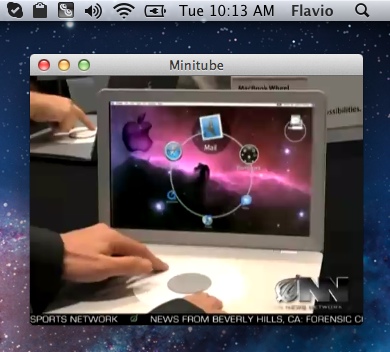
The video title and description that Minitube briefly shows at video start now have an adaptive font size so they look good both in Compact Mode and Full Screen.
As for the recent Musictube release, Ubuntu and GNOME 3 users get a shiny new Quicklist.
This release fixes a bug with videos not being downloaded on Linux with Qt 4.8 and works around GStreamer stopping playback in the middle of a video.
Unfortunately many recent Linux distributions (including Ubuntu 12.04) have a GStreamer bug that prevents many applications from playing MPEG4 videos. While we wait for the bug to be fixed, here’s a simple workaround.
Full changelog:
- Enhanced Compact Mode: window on top, can be made smaller and remembers its own position
- Adaptive video title font size
- Unity & GNOME 3 actions (aka Quicklists)
- Mac Sandbox support
- Added missing menu item to restore hidden window, as per the OS X HIG
- More responsive UI while loading videos on the Mac
- Selecting a recent keyword now also sets the searchbox text
- Selecting a suggestion now also sets the searchbox text on the Mac
- Fixed duplicate channel names in suggestions popup
- Fixed playback not starting or being interrupted on Linux
- Fixed search box being erroneously focused on the Mac
- Fixed wrong localization of some menu items on the Mac
- New and updated translations
This Musictube update fixes a critical crash bug on Linux and brings Last.fm scrobbling as previously seen in my other app, Musique.
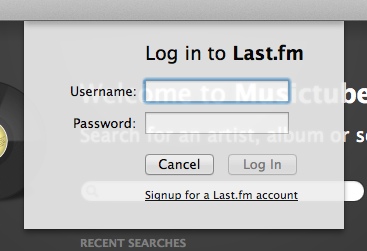
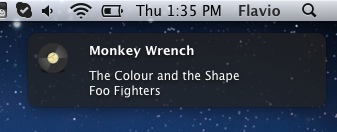
Another small feature is desktop notification support on the Mac (requires Growl 1.2.x) and GNOME. Notifications appear only when the Musictube window is not active. There is no point displaying them when you’re already looking at Musictube.
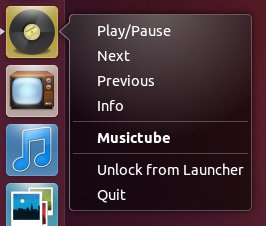
Ubuntu users will love the Unity quicklist.
Unfortunately Ubuntu 12.04 shipped with a GStreamer bug that prevents many applications from playing MPEG4 videos. While we wait for the bug to be fixed, here’s a simple workaround.
And here’s the full changelog:
- Last.fm scrobbling
- Desktop notifications on Mac (Growl 2.x) and GNOME when window is not active
- Unity & GNOME 3 actions (aka Quicklists)
- Mac Sandbox support
- More responsive UI while loading videos on the Mac
- Fixed wrong localization of some menu items on the Mac
- Fixed search box being erroneously focused on the Mac
- Fixed crash while playing on Linux with Qt 4.8
- Fixed playback not starting or being interrupted on Linux
- New and updated translations
Here’s another bugfix release. This time around is Musictube that’s slated to become, mostly, bug-free. Here’s a list of the bugs fixed:
- Fixed long artist names and album titles displaying incorrectly
- Fixed “Info View” showing while interacting with other views
- Discard videos with an incompatible duration: e.g. videos containing full albums.
- Fixed crash adding a single track to the playlist multiple times
- Fixed temporary files not being deleted on Windows
- Fixed searchbox selecting text while typing and losing focus on ESC key
- Fixed quitting from dock on the Mac and preventing the system shutdown
- On the Mac, “Quit” and other application menu items are now correctly localized
- Added missing menu item to restore hidden window, as per the OS X HIG
- New and updated translations
The update is already available on the Mac App Store and is waiting for approval on the Ubuntu Software Center. When approved, 64bit Ubuntu users will be able to get a 64bit Musictube from the USC. Enjoy & spread the word!
This Minitube release fixes bugs and brings new and updated translations. Here’s a list of the bugs that have been fixed:
- Fixed searching YouTube videos ids containing the “-” sign
- Fixed search auto-completion popup appearing when not needed
- Fixed temporary files not being deleted on Windows
- Fixed quitting from the Dock on the Mac
- Fixed bug preventing system shutdown on the Mac
- Fixed search box selecting text while typing and losing focus on ESC key on the Mac
- On the Mac, “Quit” and other application menu items are now correctly localized
Enjoy your 100% bug-free Minitube!