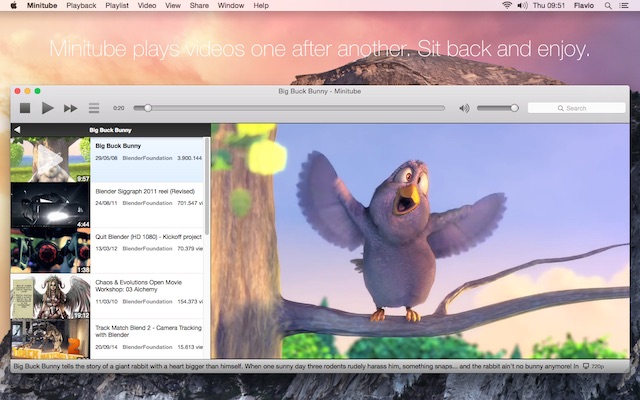
Hi all, this release brings many under-the-hood changes. The biggest one is the switch from QuickTime to VLC as the multimedia engine on the Mac. Windows users also get a major update to the VLC libraries used which should solve many reported issues. The switch to a newer VLC also brings much better and reliable video seeking and faster video start, especially with longer ones.
Feature-wise, Minitube can now create video snapshots (i.e capture frames) at full resolution just by pressing a key. Bloggers and social media users will probably put this feature to good use. The search suggestions that popup while you type received some usability and style enhancements.
Minitube now supports Mac OS X Yosemite (10.10) and works again on Snow Leopard (10.6).
On the Linux side, I decided to stop publishing Minitube via the Ubuntu Software Center: updates were approved too slowly and getting feedback was always hard. Starting from this release, I’ll take care of .deb packages directly on this site.
- Take video snapshots at full resolution
- Faster and more reliable seeking
- Faster video start with longer videos
- Slide transition in playlist navigation
- Make the volume handle red when volume is zero
- Enhancements to the search suggestions
- The Mac version is now 64bit and uses the VLC engine to play videos
- Fixed minor style issues with Mac OS X Yosemite 10.10
- Restored compatibility with Mac OS X Snow Leopard 10.6
- The Windows version has been updated to the latest VLC
- The Ubuntu & Debian version is now shipped as a .deb on the site. Goodbye Ubuntu Software Center!
- New and updated translations
Here’s a new release for Musictube. It mainly fixes video playback and lyrics fetching. It also includes minor visual tweaks to the playlist and, like Minitube 2.2, adds a --stop-after-this command line option.
- Minor style changes to the playlist
- Added –stop-after-this command line switch
- Added Stop After This Track Unity & Gnome 3 action
- Fix some videos not playing
- Fix some lyrics not loading
- New and updated translations
I rushed out this release because of playback problems with some YouTube videos. I had minor fixes and improvements ready so they’re included as well.
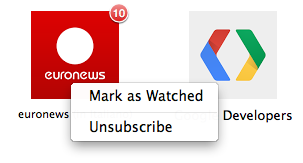 Previously one could not unsubscribe from a deleted channel. This is fixed by adding a context menu with an Unsubscribe command and while I was there I added Marked as Watched too.
For all the geeks, there’s a new --stop-after-this command line option so you can gracefully end playback from a SSH shell. For Linux people there’s a corresponding GNOME 3 action.
Next developments for Minitube will include porting it to Qt5 and replacing Phonon with libvlc. Have a great summer!
- Subscriptions context menu: Unsubscribe, Mark as Watched
- Added –stop-after-this command line switch
- Added Stop After This Video Unity & Gnome 3 action
- Fixed painting errors when scrolling playlist on Linux
- Fixed bug with dragging playlist items from the thumbnail
- Fixed some videos not playing
- Updated translations
Just a quick note to announce the release of Minitube 2.1.6 and Musictube 1.2.7. Both include a fix for the playback of some YouTube videos. A minor change in Minitube’s Browse tab removes some so-called standard feeds like Most Shared, etc. As always updated translations are included thanks to the wonderful translators at Transifex.
Just in time for Xmas, two bugfix releases are out: Minitube 2.1.5 and Musictube 1.2.6. These updates bring a fix for some YouTube videos that were not playing. I wish everybody happy holidays!
Ubuntu users will have to wait a few days until the updates are approved. Oh and by the way, I’m running a Minitube donation month in December on the Ubuntu Software Center by setting a $3.99 price on Minitube. Thanks to all the people that bought.
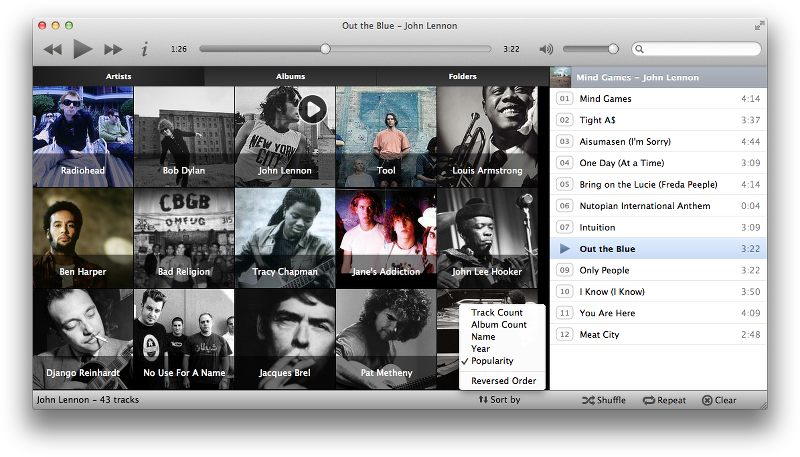 I’m quite happy to announce Musique 1.3. This update adds the much requested artist and albums sorting. The playlist look has been slightly reworked and now sports album cover thumbnails.
1.3 also includes many bug fixes and important performance improvements in the Artist and Album views.
Ubuntu users can update to 1.3 by installing musique-ubuntu on the Ubuntu Software Center (in a few days, when Musique is approved). From now on I’ll personally take care of updates so you can count on always having the latest version.
Here’s the list of changes:
- Album and artist sorting
- Album covers in the playlist
- Faster artist and album views
- Notification at end of collection scan
- Notification support on Ubuntu
- Gapless playback (Only works on Linux with the GStreamer Phonon backend)
- Find more local covers (added GIF, PNG, BMP and JPEG file types)
- Fixed homonymous albums from different artists being erroneously merged
- Fixed albums not correctly sorted when playing an artist
- Fixed play icon hover animation in Folders view
- Fixed lyrics showing showing garbage in some cases
- Fixed handling of tracks that have no associated album
- New and updated translations. A big thank you to the translators!
Just a quick note to announce the release of Musictube 1.2.3. This is a bugfix release. Here’s the complete list of changes:
- Fixed playback of VEVO videos
- Remember video visibility across sessions
- Bigger 16:9 video thumbnails
- Fixed some albums not loading tracks
- Fixed some artists not loading albums
- Fixed wrong character encoding in search suggestions
- New and updated translations
Mac App Store and Ubuntu Software Center builds are waiting for review. Just wait a few days.
By the way, yesterday I released Minitube 2.1.1 with a fix for VEVO videos too.
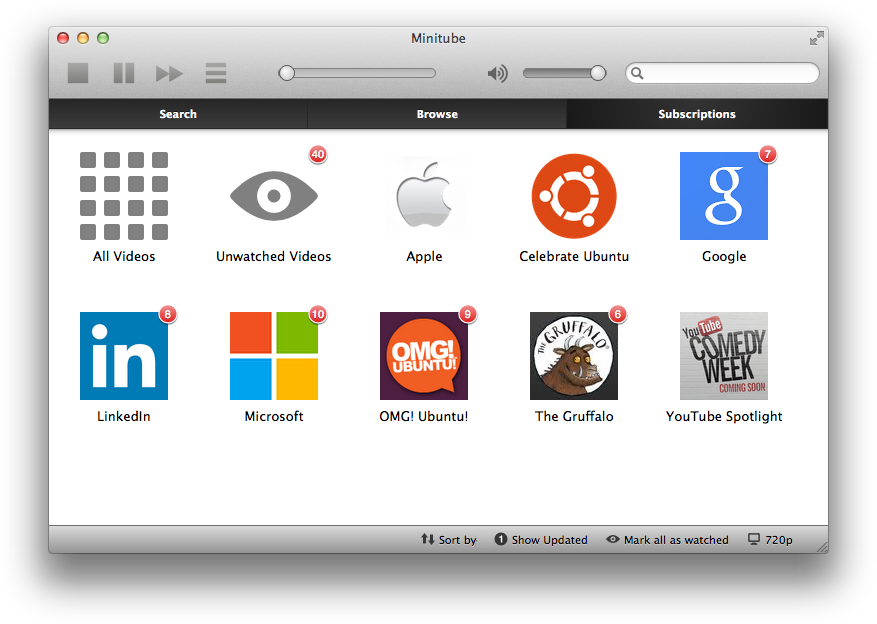
You can now subscribe to YouTube channels and be notified of new videos. This does not require a YouTube account. It’s all done by Minitube.
This release also restores playback of VEVO videos that stopped working a few days ago.
Other minor changes include:
- Move window by dragging from inside the video area
- Faster startup
- Optimizations and tweaks to the playlist
- Float on top icon was missing on Mac & Windows
- Compact mode window fixed aspect ratio on Mac
- Ubuntu notifications
- Fixed compact mode video cropped with very small window
- Fixed long words or URLs in the video description causing a window resize
- Fixed crash when resizing the playlist to a very small width
- Fixed skipping to the next video on Windows & Linux
Starting with this version I’m distributing Minitube for Ubuntu directly on the Ubuntu Software Center, personally taking care of updates. This will hopefully allow for an easier to install and more up-to-date Minitube for Ubuntu users. Just wait a few days until the package is reviewed by the USC people, then uninstall the outdated minitube package and install minitube-ubuntu.
After quite a bit of work, Minitube 2.0 is finally here! It brings new major features, usability enhancements and bug fixes. But above all, after many releases dedicated to polishing the overall experience, I finally have a vision on how to put things forward. And I have lots of things in store for 2.1.
On Mac and Windows, Minitube now autoupdates, freeing you from the hassle of manually downloading each version. Just enter your “download link” once in the license details box (in the Code field) and forget about it.
The initial view now has a Browse tab that lets you, well, browse YouTube categories and top videos. You can choose to view worldwide content or select content for a specific country.
One thing that has always been missing in Minitube is the ability to browse related videos. Many asked for it, but until now I had no idea on how to implement it. Related videos are now also added when you paste a YouTube link.
You can now navigate backward and forward in the playlist, so you can go back to previous results after trying a new search, clicking a channel name or browsing related videos.
Many translations still have to catch up with the many new strings in 2.0. Please help out by joining a team on Transifex!
And here’s the complete changelog:
- YouTube categories and “standard feeds”: “Most Popular”, “Featured”, etc
- Country selection for YouTube categories and feeds
- Autoupdate on Mac and Windows
- Related videos
- Related videos are now appended when pasting a YouTube link
- Bigger and nicer 16:9 thumbnails
- “Show 10 More” with a single click
- Play video in the playlist with a single click on its thumbnail
- Disk cache for video thumbnails
- OS X Notification Center notifications on video start
- Ubuntu Ambiance theme integration
- Fixed some YouTube links not working when pasted in the searchbox
- Fixed playlist drag’n’drop
- Fixed system language settings detection
- Fixed clicking on channel names not working in some cases
- Fixed incorrect number of downloads in status bar
- Fixed looping video with Phonon VLC backend on Linux
- New and updated translations
Have a look at Musique and Musictube updates also released today!
